
Skip to content
Ticku

Every request your team owns becomes tracked work

Mail opens a ticket. Every reply lands on that same ticket. Support, consulting, development and delivery work in one tool — inside Teams, Outlook and the web.

What Ticku does

Email to tickets
Mail to your support address opens a ticket in the right project. Every reply lands on that same ticket.
Tickets and tasks
Subjects, tickets and sub-tasks — in a list, a grid, a drag-and-drop board or a read-only Gantt timeline.
SLA and escalation
A deadline set by priority, a countdown on the ticket, and an alert when it’s breached.
Time and work logs
Per-ticket time tracking on Consulting projects, plus a personal daily work log for everyone else.

How an email becomes a ticket

Outlook · support@yourcompany.com

VPN drops every 20 minutes — Chennai office

To
it@yourcompany.com
From
priya.n@meridianlogistics.com

4 replies on this thread

09:14

Invoice 4471 — wrong PO number

To
billing@yourcompany.com
From
a.rao@meridianlogistics.com

09:31

Ticku · IT Support

SUP-1482Critical

VPN drops every 20 minutes — Chennai office

Reporter
priya.n@meridianlogistics.com
Assignee
Unassigned

Resolve by · 4 hours

3h 46m

The same 4 replies — one ticket, not four

Ticku · Billing

FIN-207

Invoice 4471 — wrong PO number

Medium

One mailbox, many teams. Ticku routes every message — nobody forwards anything.

Everything a shared mailbox can’t do

Four project types
Support, Consulting, Dev and Epic — each with its own workflow.
Ticket and task management
Subjects, tickets and sub-tasks in a list, grid, board or Gantt timeline.
Email becomes tickets
One address, one thread, tracked automatically.
SLA targets and escalation
Deadlines by priority, with breach alerts.
Roles built per project
Lead, member and viewer tiers, with permissions that match how each project actually runs.
Analytics across projects
Dashboards for throughput, SLA, and workload.
Works where your team already is
Teams, Outlook, the Microsoft 365 app, or the web.
Webhooks from other tools
Zapier, Make, or your own scripts can open a ticket too.

See all the benefits →

The two screens people live in

No mock-ups. These are real screens.

Every queue on one screen

Every ticket, sorted by status, in one filterable view. Switch between your work and the team’s.
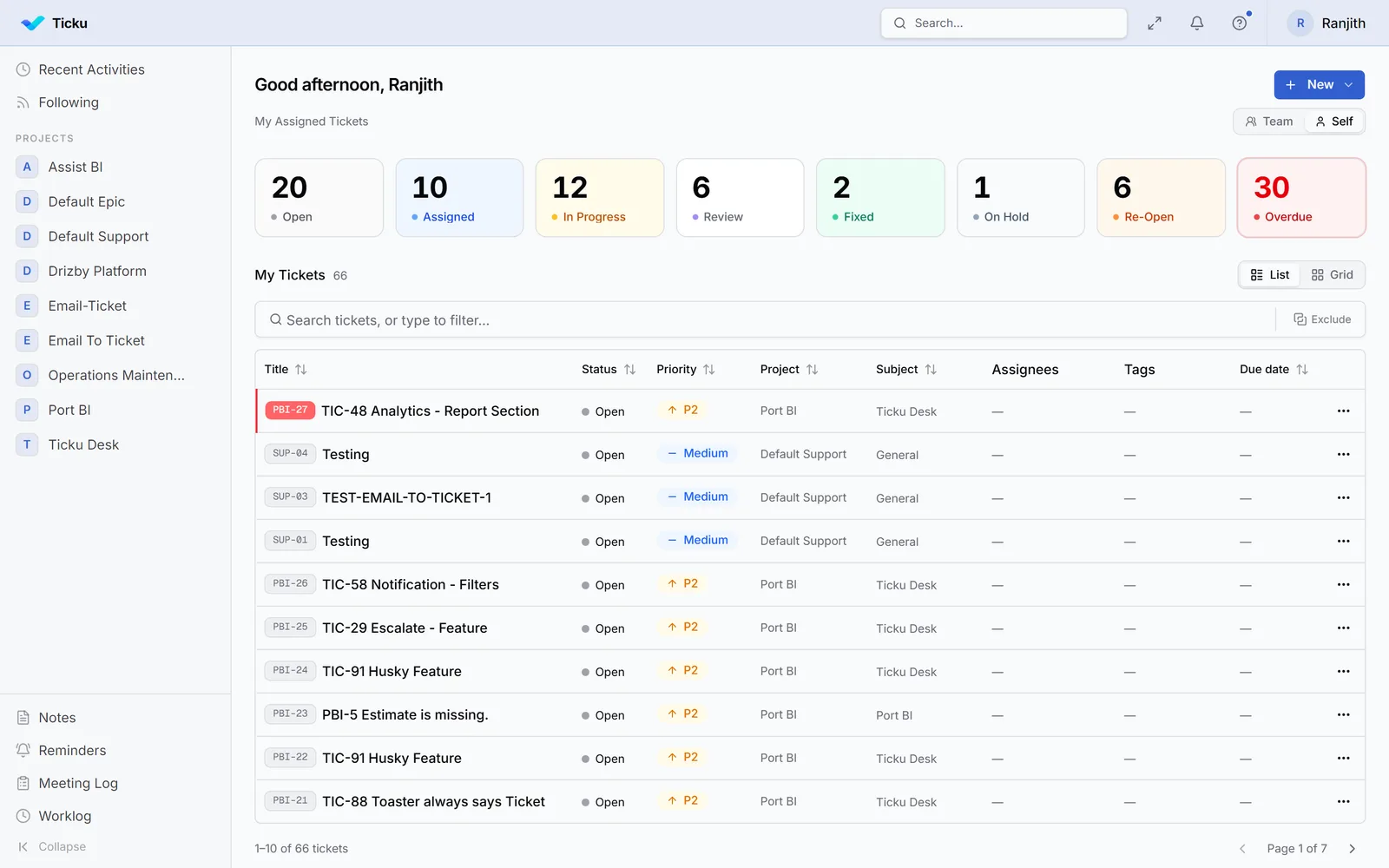
The Ticku dashboard: ticket counts by status across the top, above a searchable list of assigned tickets with status, priority, project, subject and due date columns

Reporting without the spreadsheet

Volume, status, priority and SLA compliance, charted. Any project, any date range.
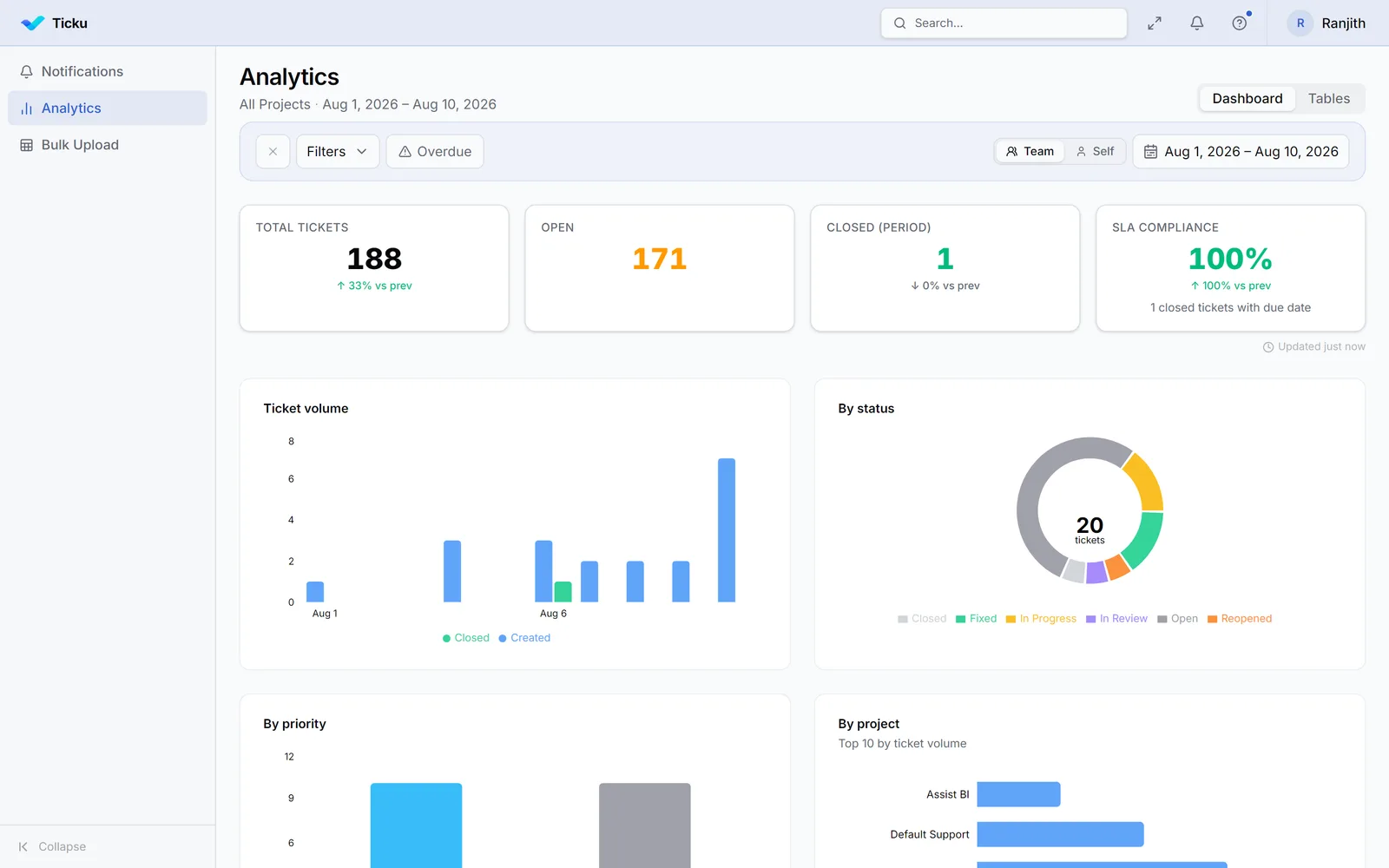
Ticku analytics: headline tiles for total tickets, open, closed and SLA compliance, above a ticket-volume bar chart, a by-status donut, and breakdowns by priority and project

A shared mailbox works until it doesn’t

No new process — just an owner for every request.

Ownership

In a shared mailbox: Everyone can see it, so nobody owns it.

In Ticku: One assignee, and a project role that decides who can change what.

Deadlines

In a shared mailbox: Late is invisible until the customer chases.

In Ticku: A countdown set by priority — four hours on Critical. A breach alerts everyone who needs to know.

History

In a shared mailbox: Search, and whatever people remember.

In Ticku: The thread, the comments and every status change stay on the ticket.

Handover

In a shared mailbox: Forward the thread and hope.

In Ticku: Add a follower to one ticket without handing them the whole project.

Six places your team already works

No new app to remember. Ticku opens inside the tools already on screen — and your customers never need it at all.

Microsoft Teams, Teams meetings, Outlook, The Microsoft 365 app, Any web browser, and Your customer’s inbox.

Sign-in, permissions and Microsoft 365 fit →

Common questions about Ticku

What is Ticku?

Work and service management software — support tickets, consulting, development and initiatives — inside Microsoft Teams, Outlook and the web.

Does Ticku only work with Microsoft 365?

No — mail can also arrive via Gmail, Zoho, or a webhook from tools like Zapier.

Do people need a separate login for Ticku?

Not in Teams — sign-in is silent. On the web, Microsoft sign-in or email plus a one-time code.

Can people use Ticku on a phone?

Yes. The Teams tab works on Teams mobile, and the web app works in any mobile browser. Nothing to install.

Is one organization’s data separated from another’s?

Yes — every organization is its own isolated tenant.

How does an organization get started?

Register on the web — 90 days to evaluate it, no card required. If it fits, you start paying and carry on in the same tenant.

Looking for setup detail? Read the documentation.

Evaluate Ticku for 90 days

Register your organization, connect a mailbox, and create your first project. No card, no sales call to get started — start paying when you decide to keep it.

Prefer email? ticku@analyticsaura.com